
A Complete Comparison of Design, Speed & Store Features
Choosing the right WordPress theme for your eCommerce store is one of the most important steps when building an online shop. A well-designed theme ensures your store loads fast, looks professional, works smoothly across devices, and makes checkout easy for customers. In a market crowded with themes, finding one that balances design, speed, flexibility, and compatibility with powerful eCommerce plugins (like WooCommerce) can feel overwhelming. That’s why this post offers a carefully curated list of the best themes for eCommerce in 2025 — ranging from lightweight and performance-oriented to feature-rich multipurpose options.
We’ll walk you through important selection criteria, compare top-performing themes side-by-side, and offer in-depth reviews so you can choose the one that fits your store’s needs, niche, and growth plans. If you’re looking for a robust, highly customizable theme with drag-and-drop page-building and store-optimized layouts, I’ll also show you why Divi stands out and how it can help you create a store that sells — without needing custom code.
What Makes a Great eCommerce WordPress Theme

Before diving into specific themes, it’s worth clarifying the features and qualities that define a top-tier eCommerce theme. A good eCommerce theme should deliver on the following:
- Speed & performance — fast load times, clean code, and minimal bloat for good user experience and SEO.
- Mobile responsiveness — compatibility with phones/tablets so shoppers have a seamless experience on any device.
- WooCommerce compatibility — seamless integration with WooCommerce (or your preferred plugin), including product pages, carts, checkout, and shop layout.
- Customization flexibility — ability to customize layouts, colors, fonts, headers, footers, product listings, without coding.
- Design & user-experience — appealing visual design, easy navigation, clean product layouts, and intuitive UX.
- Scalability & extendability — ability to support growth (lots of products, traffic), add plugins/extensions, and adjust store features as needed.
- Support & updates — active developer support, regular updates, and compatibility with latest WordPress versions.
With those criteria in mind, below are the top WordPress themes for eCommerce — from light and fast to full-featured and highly customizable.
Comparison Table: Top WordPress Themes for eCommerce
| Theme | Best For | Strengths / Key Features | Potential Limitations |
|---|---|---|---|
| Divi | Store owners who want full design control + all-in-one solution | Drag-and-drop builder, WooCommerce-ready, many modules/layouts, fully customizable store pages, responsive design, built-in split testing & optimization. | Premium (paid) theme, learning curve for beginners with no prior page-builder experience |
| Astra | Light, fast stores; users who prefer performance + simplicity | Lightweight, fast, clean code, many starter site templates (including WooCommerce stores), works well with page builders or Gutenberg, free & premium versions. | Premium features require upgrade; less design-driven than builder themes |
| OceanWP | Shops needing flexibility + good free tier support | Solid performance, WooCommerce integration, good free theme starter, many extensions, versatile layout options | Some deeper customizations need paid extensions; configuration can be more complex |
| Flatsome | Fashion, lifestyle, boutique stores with heavy imagery & design needs | Built-in shop layouts, quick view & filter options, responsive and mobile-friendly, creative design focus | Premium only; may need optimization if many plugins used |
| GeneratePress | Minimalist stores prioritizing speed & stability | Lightweight, clean code, very fast, modular approach, flexible with WooCommerce, good for custom or minimal shops | Less pre-built design/layout compared to builders; design work needed for visual flair |
| Storefront (official WooCommerce theme) | Beginners / simple shops; developers who build from scratch | Created by WooCommerce developers — best compatibility & stability, free, frequently updated, bare-bones for customization | Very minimal design out-of-the-box; requires customization or child theme for unique look |
| Neve | Fast-loading stores & good for small to medium shops | Lightweight, modern design, WooCommerce optimized, good out-of-the-box templates | Premium features often required for best results; fewer built-in layout options |
Detailed Review of Each Theme
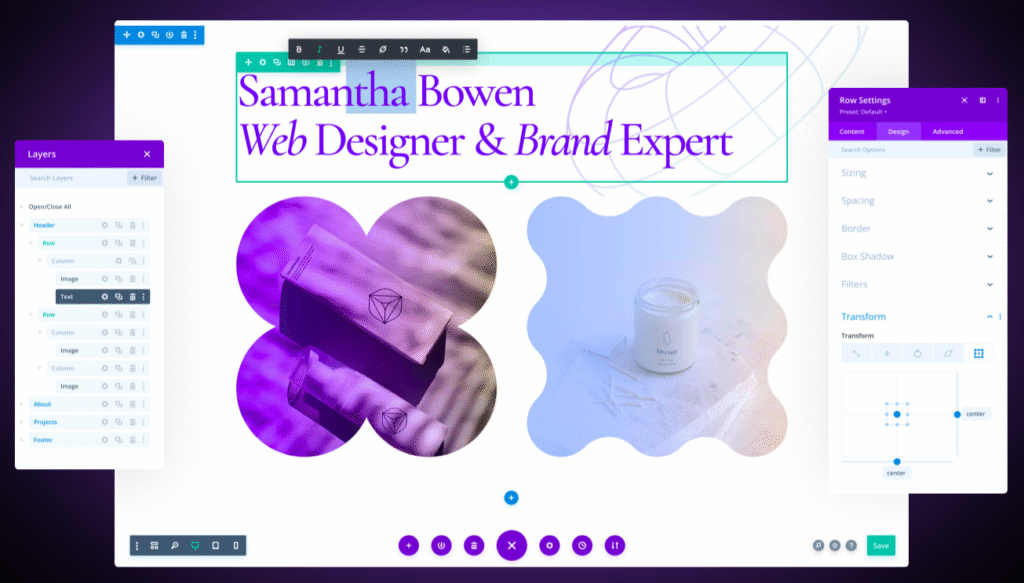
Divi — The All-in-One, Design-First eCommerce Theme
If you want full creative control without touching code, Divi is one of the most versatile WordPress themes for eCommerce. Divi combines a powerful drag-and-drop builder with deep WooCommerce support, letting you design entire store pages — homepage, product grid, single product pages, cart, checkout — exactly how you want.
Why Divi shines:
- Visual Page Builder + Modules — Divi comes with a robust builder and over 40 content modules (sliders, galleries, testimonials, CTAs, product grids, etc.).
- Full WooCommerce Integration — Product pages, checkout flows, store layout, and product displays blend with your design; no need for custom templates.
- Pre-made Layouts & Store Templates — Quick-start templates help get a stylish store up in minutes without design work.
- Responsive & SEO-Ready — Divi is built with responsiveness and optimization in mind, helping stores perform well on desktop and mobile.
- Flexibility & Customization — From headers to footers, typography, colors, layout — every aspect is customizable. You can also add custom CSS if needed.
Considerations:
- Divi is a premium theme (membership of Elegant Themes required), so there’s a cost compared to many free/light themes.
- Page-builder-based themes sometimes add extra code, which means you should optimize carefully (e.g. caching, lazy loading, optimized images) to maintain speed.
- Learning curve: although drag-and-drop is easy, mastering layout and modules takes time — but it pays off with full design control.
Bottom line: Divi is ideal if you want a polished, unique, custom-designed eCommerce store that stands out — without hiring a developer.
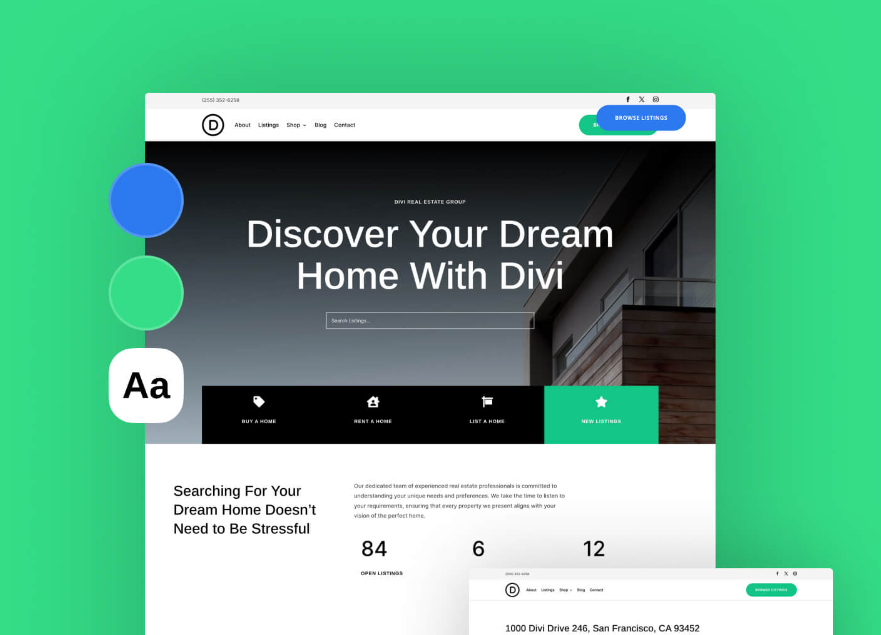
Astra — Lightweight and Performance-Oriented
For those who prioritize speed, minimalism, and clean code over heavy design, Astra is a leading choice. It’s especially favored when you want a shop that loads quickly, is easy to manage, and pairs well with block editors or page builders.
- Speed & Performance: Astra is known for lean code and fast load times — critical for SEO and user experience.
- WooCommerce Starter Sites: Many ready-made eCommerce templates; quick setup for small to medium stores.
- Flexibility with Gutenberg or Page Builders: Works great with block editor or builders like Elementor / Beaver / Brizy — or custom coding.
- Free & Premium Options: You can start free; upgrade to Pro if you need advanced shop features or customizations.
When Astra is best: small to mid-size shops, stores where performance and simplicity matter more than heavy visual design, or sites where you want to mix static pages and blog content with shop pages.
OceanWP — Versatile Free-to-Premium Theme for Shops
OceanWP offers a great balance between flexibility, functionality, and affordability (with strong free-tier options). It’s often praised for:
- Solid WooCommerce integration — product galleries, checkout compatibility, store layouts
- Good range of extensions: pop-ups, extra widgets, additional layout controls
- Responsive design and broad browser/device support
It’s an especially good pick if you want a flexible theme and anticipate growing your store over time. For beginners on a budget, the free version provides a solid foundation; for more advanced shop features, paid extensions unlock more possibilities.
Flatsome — Great for Visual, Design-Focused Stores
For shops in fashion, lifestyle, or any niche where imagery, layout, and visual appeal are key, Flatsome stands out. It’s popular because:
- Built-in shop layouts, quick view, filters, product galleries, and shop-centric design
- Mobile-ready responsive design — essential for modern online shoppers
- A more “theme-based” approach (less page-builder heavy) — often quicker to launch
If your store emphasizes visuals — like clothing, home decor, art, or branded lifestyle products — Flatsome offers a streamlined way to build attractive product pages without a steep learning curve.
GeneratePress — Minimal, Fast & Developer-Friendly
GeneratePress is all about speed, stability, and modular simplicity. It’s popular among developers and store owners who want a lightweight, well-coded base for building their stores.
- Minimal, clean code helps ensure fast performance
- Modular approach: enable only what you need — keeps the site lean
- Great for developers or users comfortable customizing via hooks or custom CSS
If you want maximum control, minimal overhead, or intend to build a very custom shop (or integrate custom plugins), GeneratePress gives a strong foundation. The downside is that out-of-the-box design is minimal — you’ll need to design more manually or via block editor.
Storefront — Official WooCommerce Theme, Best for Simplicity & Compatibility
Built by the team behind WooCommerce, Storefront is the official theme for the plugin. It’s ideal for:
- Users who want maximum compatibility with WooCommerce — updates, extensions, and integrations are seamless
- Simple stores, digital goods shops, or creators focused purely on function over design
- Developers who prefer to build custom themes/child-themes or rely on minimal base styles
It offers high stability and reliability. On the flip side, the default design is very basic, so you may want to enhance its look with a child theme or custom CSS/ styling plugins.
Neve — Modern, Fast & Good for Small-to-Medium Shops
Neve is a modern WordPress theme optimized for speed and usability. For eCommerce, it offers:
- WooCommerce-ready templates and layouts
- Lightweight framework that keeps performance high
- Flexible customization and compatibility with block editors/page builders
Neve is a solid middle ground if you want a balance between modern design and performance without over-complicating setup.
How to Choose the Right Theme for Your eCommerce Store

Selecting a theme isn’t just about how it looks — it’s about matching features to your store’s goals. Ask yourself:
- What kind of store are you creating?
- Simple digital products or books → lightweight & minimal (Astra, Storefront, GeneratePress)
- Visual-heavy shop (fashion, art, lifestyle) → design-focused (Flatsome, Divi)
- How important is page speed or SEO?
- Very important → go with lightweight, fast themes (Astra, GeneratePress, Neve)
- Do you want a unique design or quick setup?
- Unique & branded → Divi or Flatsome
- Quick, low-maintenance → OceanWP, Storefront, or a starter template
- Are you comfortable customizing, or do you prefer drag-and-drop?
- Drag-and-drop: Divi, Flatsome
- Manual coding/customization: GeneratePress, Storefront
- Are you planning to scale the store significantly?
- For large catalogs or many products → pick a theme known for stability and WooCommerce compatibility (Divi, Astra + Woo add-on, OceanWP)
Why Divi Is a Great Pick (and How to Use It Effectively)
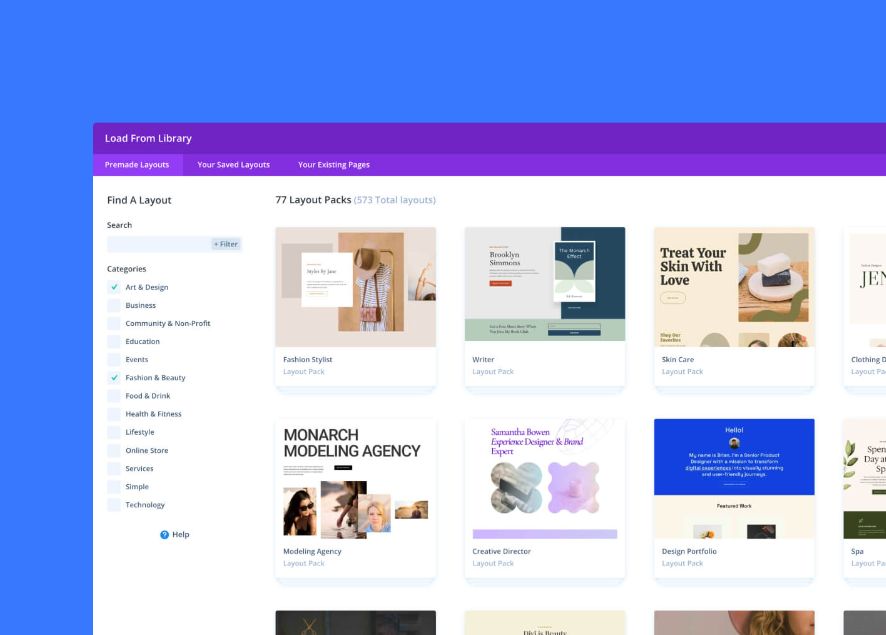
If you’re a store owner who values design flexibility, brand identity, and full control — Divi is hard to beat. Here’s how to make the most of it:
- Use pre-built store or landing page layouts — save time, skip design from scratch.
- Customize product pages & checkout — make your store look unique, creating a smooth user experience.
- Split-test different layouts or elements — Divi offers built-in tools for optimization and conversions.
- Keep performance in mind — optimize images, enable caching, and limit heavy modules.
- Use child themes or backups — since Divi is powerful, changes can become complex; make backups to avoid layout issues.
With Divi, you can design a store that reflects your brand, feels modern, and works well — even if you don’t code.
When a Lightweight Theme Makes More Sense
Not every store needs a full builder like Divi. If you’re just starting out, selling a small selection of products, or care mostly about speed and reliability, a lighter theme often delivers better performance and fewer maintenance headaches. Themes like Astra, GeneratePress, Neve, or Storefront offer clean foundations, quick load times, and fewer “moving parts.”
These themes also tend to be more future-proof when you add plugins or scale — less chance of conflict, easier to optimize, and less resource-heavy (good for hosting costs, speed, user experience).
Pro Tips Before Launching Your eCommerce Site
Use a staging site first — test themes, plugins, and design before going live.
Optimize images & assets — heavy images slow down any theme, so compress and lazy-load wherever possible.
Enable caching & performance plugins — to ensure fast load times, especially with heavy themes.
Mobile-first design — always preview and optimize for mobile; many users shop via phone.
Stay updated — use themes and plugins that receive regular updates and support; this helps with security, compatibility, and feature access.
Conclusion

Building a successful WordPress eCommerce store begins with the right foundation — and that foundation is the theme. Whether you value blazing-fast performance, minimal code, or full creative control, there’s a theme that fits your needs.
If you want maximum flexibility, a polished and unique design, and the ability to build your store exactly as you envision it, Divi is a top choice. Pairing it with WooCommerce gives you the tools to build a high-quality shop without coding.
If you prefer speed, simplicity, and minimal maintenance, themes like Astra, GeneratePress, or Storefront are excellent choices — especially for small, lightweight shops or digital-product stores.
Ultimately, the “best” theme depends on your goals, products, and long-term plans. Choose based on what your store needs now — and how you’ll scale in the future.
If you decide to go for Divi and want a full-featured, design-ready, scalable store — give it a try today:
Good luck building your perfect eCommerce shop!