
Building a membership website on WordPress can transform the way you deliver value to your audience — whether you’re offering exclusive content, online courses, digital downloads, or a members-only community. With the right setup, a membership site can generate passive income, foster loyalty, and create a sense of belonging among your audience. But success depends on more than just creating a “Login” page: you need secure payment integration, content protection, tiered access, and a smooth user experience. That’s why many site owners choose a dedicated membership plugin to handle all this for them.
One of the most flexible and feature-rich options is DigiMember. With DigiMember, you can turn any WordPress page into a protected members-only area, set up different membership levels, integrate payment providers, and automate content access — all without coding. In this guide, we’ll walk you through everything you need to build a fully functional membership site: from hosting and setup fundamentals to plugin configuration, content restriction, payment gating, and best practices for growth. By the end, you’ll know exactly how to launch your membership site — and how DigiMember can simplify and streamline the process.
Why WordPress Is Ideal for a Membership Website

Before diving into plugins and technical setup, it’s useful to understand why WordPress remains one of the best platforms to build a membership site:
- Flexibility and control: WordPress gives full control over design, content, and access rules. You own your platform, data, and user base — no dependency on third-party proprietary platforms.
- Massive plugin ecosystem: You can integrate eCommerce, payment gateways, email marketing, forums, LMS features, and more — customizing the site based on your needs.
- Scalability: Whether you have dozens of members or thousands, WordPress can grow with you (with appropriate hosting and optimizations).
- Content management power: Since it’s originally built as a content platform, handling posts, pages, media, uploads, etc., is native — ideal for blogs, courses, digital products, or exclusive content.
These strengths make WordPress a top choice for membership websites — but only if you implement it carefully, with the right plugins and setup, to ensure performance, security and usability.
Key Components of a Successful Membership Site

To build a membership site that works long-term and satisfies members, you need more than just “members only” pages. Here are essential components to plan for:
- Secure hosting, domain & SSL — Protect user data, secure login/payment details, and maintain trust.
- Clear membership structure — Decide whether you will offer free, paid, or tiered membership levels (monthly, lifetime, one-time fee, etc.).
- Reliable payment gateway integration — For paid memberships, support gateways like PayPal, Stripe, or other supported processors to accept subscriptions or one-time payments.
- Content restriction & protection — Make sure premium content (posts, pages, downloads, media) is accessible only by authorized members.
- User registration and management — A user-friendly registration, login, profile, and membership dashboard for members.
- Optional extras: drip content release (timed content access), email integration, discount codes, forums/community access, download vaults, member management tools, analytics.
With these in place, you can create a secure, easy-to-use, and scalable membership system that provides real value to your audience — and revenue for you.
Comparison of Popular WordPress Membership Plugins (Including DigiMember)
| Plugin | Strengths / Key Features | Best For (Use Case) | Limitations / Considerations |
|---|---|---|---|
| DigiMember | Easy installation, turns any WP page/post into a secure members-only area; supports unlimited membership levels; integrates with many payment gateways; supports timed/content drip, download protection, certificates, email marketing integration. | Course creators, digital product sellers, subscription sites, content creators needing flexible paid/free access control | Paid (for full features); setup might take time for advanced options; fewer community size than very popular plugins |
| ARMember | Free + premium versions; user-friendly; easy to set up membership levels, payment, content restriction. | Small to mid-size membership sites, online courses, simple content gating | Advanced features might require addons; less known than big players |
| Paid Member Subscriptions | WooCommerce integration, ability to sell subscriptions as products, manage discounts, restrict product viewing, recurring payments, add-ons available. | Shops + memberships, WooCommerce stores needing user subscription control & exclusive products | Complex setups for advanced content structure; add-ons may cost extra |
| Restrict Content / Simple Membership / WP-Members | Lightweight, simpler to configure, good for straightforward content restriction; often free or affordable. | Blogs, small membership / content-gated sites, those prioritizing simplicity | Limited advanced features: might lack built-in payment gateways, drip content, or advanced subscription management |
| LMS + Membership Plugins (LearnDash / LifterLMS with membership add-ons) | Ideal for course-based membership sites, drip lessons, quizzes, user tracking, progress control. | Educators, course creators, community-based learning platforms | Higher complexity; needed learning curve; often more expensive; may involve combining multiple plugins |
Why DigiMember stands out for many use cases: It combines flexibility (unlimited membership levels, content drip, download protection) with ease-of-use and powerful integration options. For many creators — especially those delivering digital products, courses, or subscriber-based content — it offers a balance between feature set and usability.
Step-by-Step: How to Build a Membership Site with WordPress + DigiMember
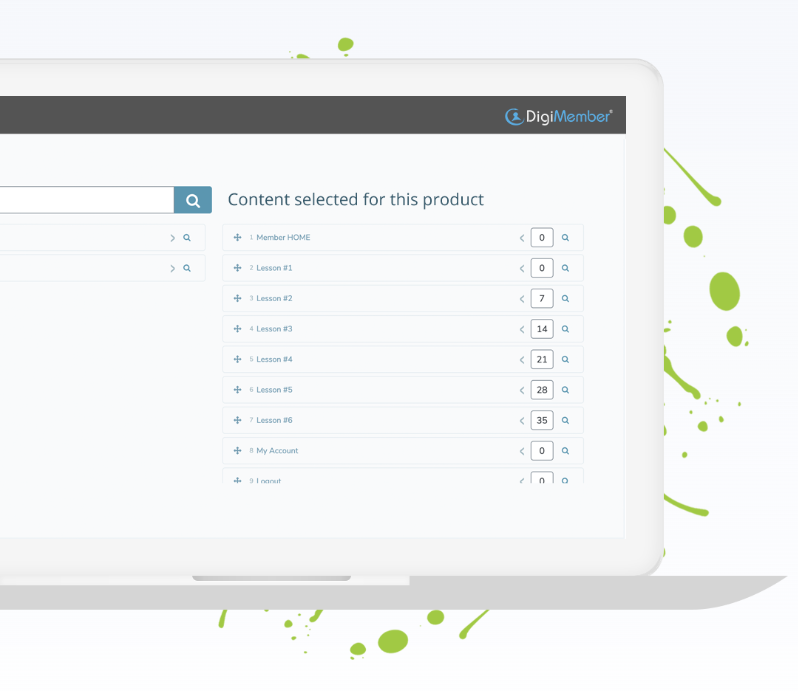
Here’s a clear, practical step-by-step guide — from zero to launch — for building your membership website using WordPress and DigiMember.
Step 1: Prepare Hosting, Domain & WordPress Installation
- Choose a reliable hosting provider — ideally optimized for WordPress, with good performance and security.
- Register a domain name that reflects your brand or niche.
- Install WordPress (most good hosts offer one-click install).
- Ensure you have an SSL certificate — necessary for secure logins and payment handling; also helps with SEO and trusted user experience.
Step 2: Install & Activate DigiMember
- In your WordPress dashboard, go to Plugins → Add New, upload/install DigiMember, then activate it.
- After activation, you’ll find a new DigiMember menu for setup.
Step 3: Configure DigiMember Basic Settings
- Define general settings: currency, email templates, payment gateway details, membership terms, access/login pages.
- Set up payment integration with providers supported by DigiMember (PayPal, Stripe, ClickBank, etc.).
- Choose whether you want free memberships, paid memberships, or a combination of both.
Step 4: Create Membership Levels & Access Rules
- Define your membership levels (e.g. Free, Basic, Premium, VIP). Each level can have unique price, duration (one-time, recurring, lifetime), and access rights.
- Map your content: assign which pages, posts, downloads, or media are accessible by which membership tiers.
- If needed — configure drip content (timed release), download limits, or download vault for protected files. DigiMember supports these advanced features.
Step 5: Build Registration & Login Pages
- Use DigiMember’s built-in registration and login forms — customize them to match your site design.
- Add navigation links: login, register, account area — make sure users can easily sign up, login, and access content.
- Test the registration flow: create test accounts (free and paid), confirm payment integration, ensure access is granted correctly.
Step 6: Create Member Content & Layout
- Plan your member-only content: tutorials, eBooks, videos, downloads, lessons, community posts, etc.
- Organize content logically: use categories, menus, custom post types if necessary.
- Use clear naming and directories — helps both for user experience and site management.
Step 7: Optional Enhancements — Email, Community, Drip, Add-ons
- Integrate with email marketing tools — DigiMember supports many popular email services, helping you automatically add new members to your mailing list.
- Consider adding forum/community features or comment/social features — helps build engagement, sense of belonging, lowers churn. Many membership sites benefit from community aspects.
- Use drip content or scheduled release — helpful if your content is course-based or you want to gradually introduce members to material.
Step 8: Optimize Performance and Security
- Use caching and performance plugins to keep your site fast. Membership sites often have many registered users, so performance matters.
- Ensure security: use SSL, strong login protection, regular backups. Membership websites handle sensitive data (user accounts, payments), so security is critical.
- Optimize images, use CDN if needed, and avoid unnecessary heavy plugins to keep the site lean and user-friendly.
Step 9: Launch, Test & Monitor
- Test full sign-up and payment flow (sandbox/live), test content restriction, ensure no leaks of restricted content.
- Ask a trusted friend or colleague to test from outside — register as non-member and attempt to access restricted content.
- Monitor user feedback, site performance, and subscription activity.
Best Practices & Common Mistakes to Avoid

Even with the right plugin, many membership sites fail because of planning or execution mistakes. Here are some best practices — and pitfalls to watch out for:
✅ Best Practices
- Clearly define membership tiers and benefits before launching — avoid confusion and ensure value is obvious.
- Use a mix of free and paid content (freemium model) to give new users a taste before conversion.
- Provide value consistently — drip content or regular new content keeps members engaged and reduces cancellations.
- Build community — forums, exclusive groups, or member-only discussions increase retention.
- Automate communications — welcome emails, renewal reminders, periodic newsletters. DigiMember’s email integrations make this easier.
- Optimize user experience — smooth registration, intuitive navigation, quick login, clean design — all matter for conversions and user satisfaction.
❌ Common Mistakes to Avoid
- Launching with too many membership levels or options — too much choice can overwhelm and delay signups.
- Neglecting site performance — heavy plugins + many users can slow down the site and cause bounce.
- Poor content structure or messy navigation — members should easily find what they paid for.
- Not protecting download links or media — if you offer digital products, make sure downloads are secure and not easily shareable. DigiMember’s download vault helps with that.
- Forgetting to test — always test registration, payments, access, and cancellation flow before going live.
Why DigiMember Could Be the Right Choice for You
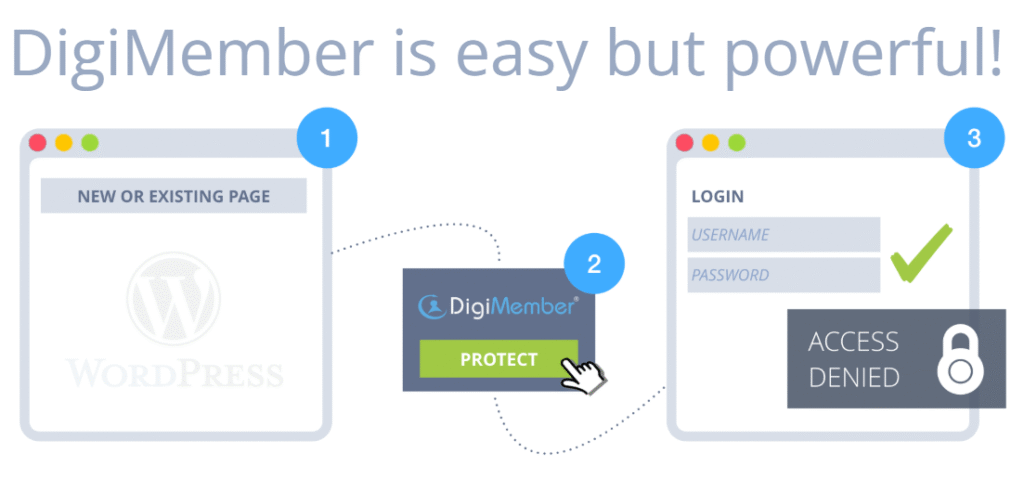
Here’s why I often recommend DigiMember — especially if you want flexibility, automation, and reliability:
- All-in-one functionality: It handles registration, payments, content protection, download protection, tiers, drip content, certificates, email integration — all in one plugin.
- Flexible content control: You can protect single pages, entire courses, files, downloads — or combine free and paid content. Great for courses, digital products, or mixed membership models.
- Payment & access automation: Once configured, the plugin handles access automatically depending on payment status. It can revoke access if payments lapse — essential for subscription-based models.
- Scales with your site: Whether you have 50 or 5,000 members, DigiMember can manage multiple levels and diverse content types without needing multiple plugins.
- Ease of use: Setup is straightforward for WordPress users — no coding required, and you get a functional membership site in a matter of hours to days.
If you’re ready to launch a membership site, it’s worth exploring DigiMember — start building a protected, professional, and scalable membership platform today.
FAQs: Common Questions About Building a Membership Site on WordPress
Q: Do I need a paid plugin to build a membership site?
A: Not necessarily — there are free plugins and basic membership solutions available. But for full automation, payment handling, content restriction and support, a premium plugin like DigiMember often provides the most seamless experience.
Q: Can I offer free and paid memberships at the same time?
A: Yes — many plugins (including DigiMember) allow a “freemium” model: free access to some content, paid access for premium content or levels.
Q: What about security and data protection?
A: Use SSL, secure hosting, and best practices (strong passwords, backups, security plugins). Also ensure payment data is handled securely. It’s wise to keep membership plugins and WordPress versions updated.
Q: Can I drip content over time instead of releasing everything at once?
A: Yes — drip content is a common feature. With this you can schedule content to unlock weekly, monthly, or based on time intervals. Great for courses or gradually delivered material.
Q: Can I integrate email marketing or community features?
A: Absolutely — many membership plugins (including DigiMember) support email marketing integration. You can also combine with forum or community plugins to build member interaction and retention.
Conclusion

Creating a membership website with WordPress is a powerful way to deliver value, monetize content, and build a dedicated community. With the right approach — reliable hosting, clear membership structure, payment integration, content management, and user experience — you can have a fully functional, scalable membership site that serves members and grows with your ambitions.
If you want a flexible, all-in-one solution that handles everything from user registration to payment automation to content protection — DigiMember offers a robust platform to build your membership site without coding or complicated setup. Whether you’re offering online courses, exclusive content, digital downloads, or a community, DigiMember can be the backbone of your project.
Ready to build? 👉 Try DigiMember and start creating your membership site today.